Firms already decide which bids to chase, check drawings before they leave the office, and form a view of which clients are happy. Mostly that happens on paper, in a spreadsheet, or in someone’s head. Assessments in tiny+ now give each of those jobs its own shape, and keep the result on the project or company it is about.
Go/No-Go: the score recommends, a person decides
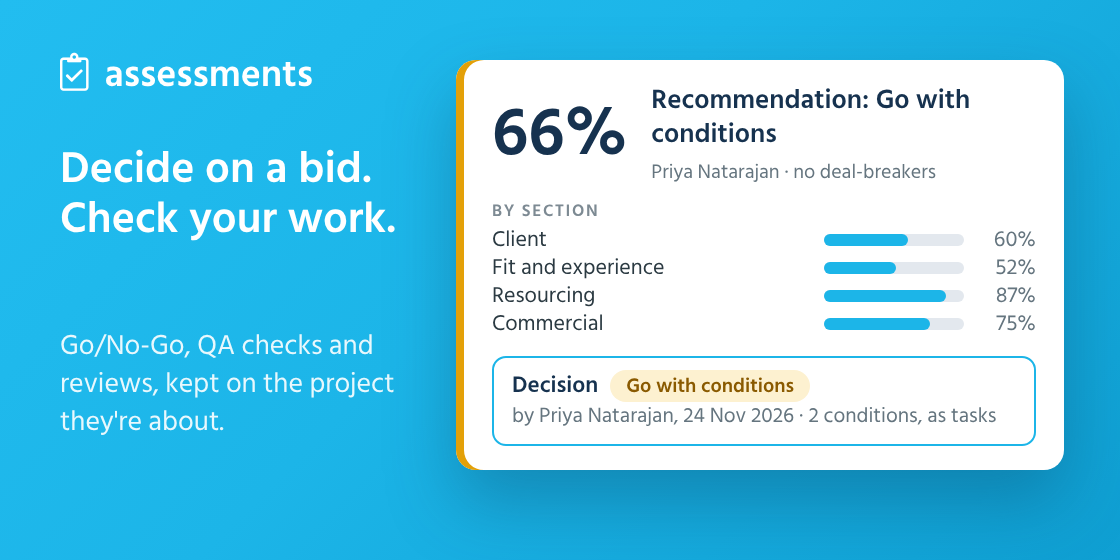
Answer the questions your firm weighs a bid by, in sections with their own weights, and tiny+ works out a score and a recommendation: Go, Go with conditions, or No go. A deal-breaker recommends No go whatever the rest says.
Then someone your firm names makes the call and says why. Conditions become tasks with an owner and a date. The decision stays on the project, with what the score was and who decided. On Pro, a rule can require a Go/No-Go at a status or phase and hold a project there until a decision supports moving on.
QA checks: on a phone, signed off, with a PDF
Pass, Fail or Not applicable, with a note and photos on any answer. Every failed item is a finding, and each one can become a task with an owner and a due date. A second person signs the check off, and every finished check has a PDF for the project file.
When a certification auditor asks what you checked, what you found and what you did about it, it’s all on the project. Your certification body decides what it accepts.
Reviews: read across the years
Review clients once a year, projects at close-out, bids when you hear the result, and subconsultants when the work’s done. Each review gives a rating out of 5 with bands your firm names, and the company keeps its reviews, so a slide shows.
Start from your own checklist, or from ours
Nine ready-made forms cover Go/No-Go, QA checks and reviews: use one as it is or change it. On Pro, the tiny+ AI engine drafts an assessment from the form you already use, or from a few lines describing what you want, for you to check before anyone sees it.
Asked for on time, and read in the places you already look
Ask someone to do one, with a due date and a note, and they’re reminded before it’s due and when it’s late. On Pro, a schedule asks for you. Results show as a column in your project table, a mark on each card of the pipeline board, and panels on your dashboards. On Pro, a Results page shows whether the bids that scored well were the ones you won.
Go/No-Go, QA checks and reviews are on every plan. Schedules, Results, rules and drafting with the tiny+ AI engine are on Pro.